Schedule
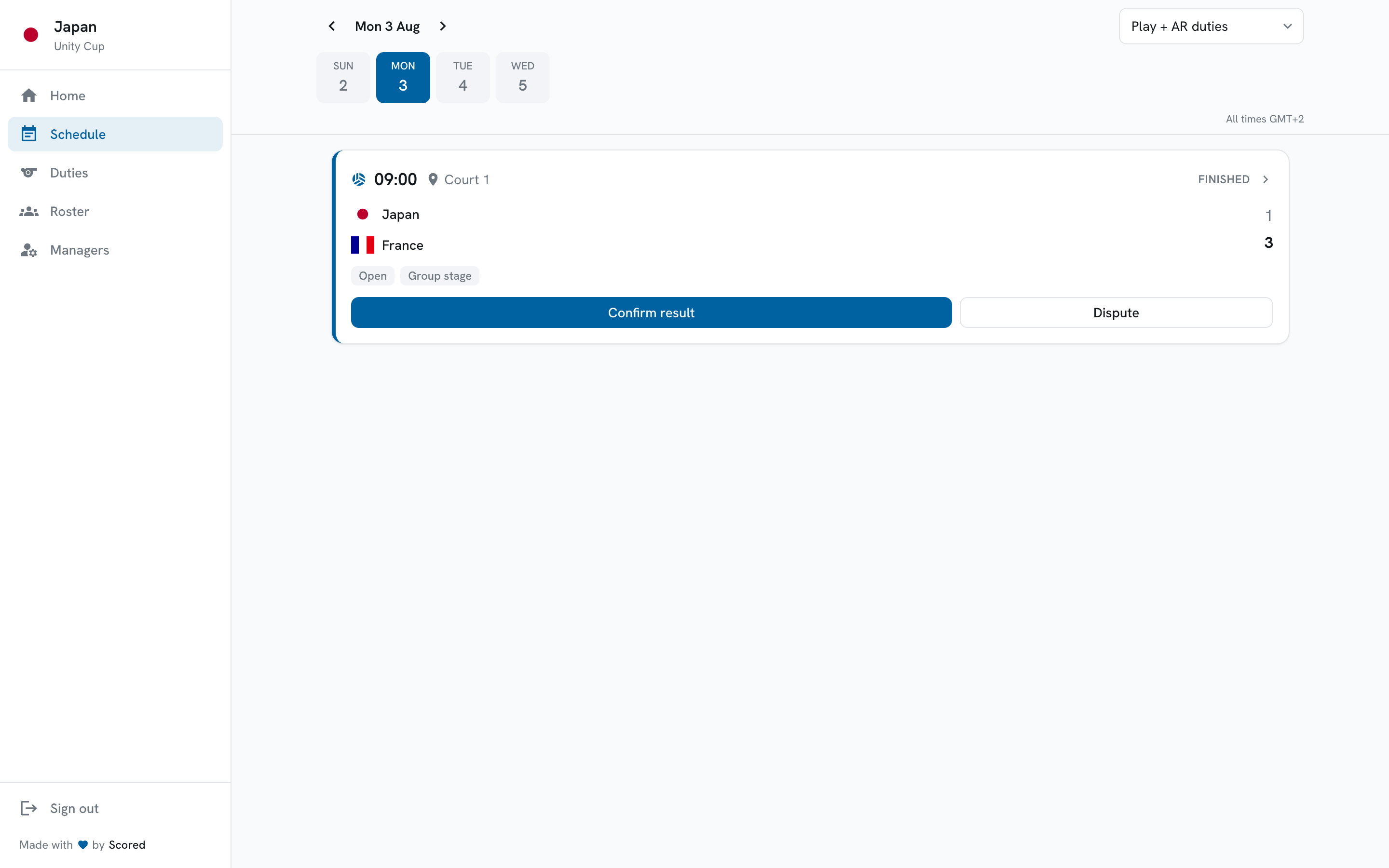
The Schedule tab is your full fixture list, one day at a time. It shows both the matches you play and the assistant-referee duties you have been given, in the order they happen.
Choosing a day
Section titled “Choosing a day”The bar across the top steps through the tournament’s days. Tap a day to jump to it, or use the arrows to move one day at a time.
It opens on today. Before the tournament starts it opens on day one, so you can see your opening fixtures without hunting for them.
Filtering
Section titled “Filtering”The dropdown on the right narrows the feed to just the matches you play, or just your assistant-referee duties.
Reading a card
Section titled “Reading a card”Every entry in the feed is a card, and they all read the same way whatever state the match is in: the time and court, the two teams, and what the card wants from you.
An upcoming match will offer you the lineup. A finished one will ask you to confirm the result.
Tap any card to open the match.
Sharing a link
Section titled “Sharing a link”The day and team you are looking at are part of the address. Copying the link from your browser and sending it to a co-manager opens the same day and the same team for them, rather than dropping them on today.
When a day is empty
Section titled “When a day is empty”If nothing is scheduled, you will see a note saying so for that day. That is normal on rest days and before the organizer has published the fixtures.
If the tournament has no dates set at all, the schedule cannot be built yet - that is on your organizer to fill in.