Structure
Structure is the shape of your competition: which divisions you run, and which stages each one plays. Everything else builds on it. Teams join a division, seeding fills the places inside a stage, and the schedule puts the resulting matches on courts.
Open it from Structure in the tournament sidebar.
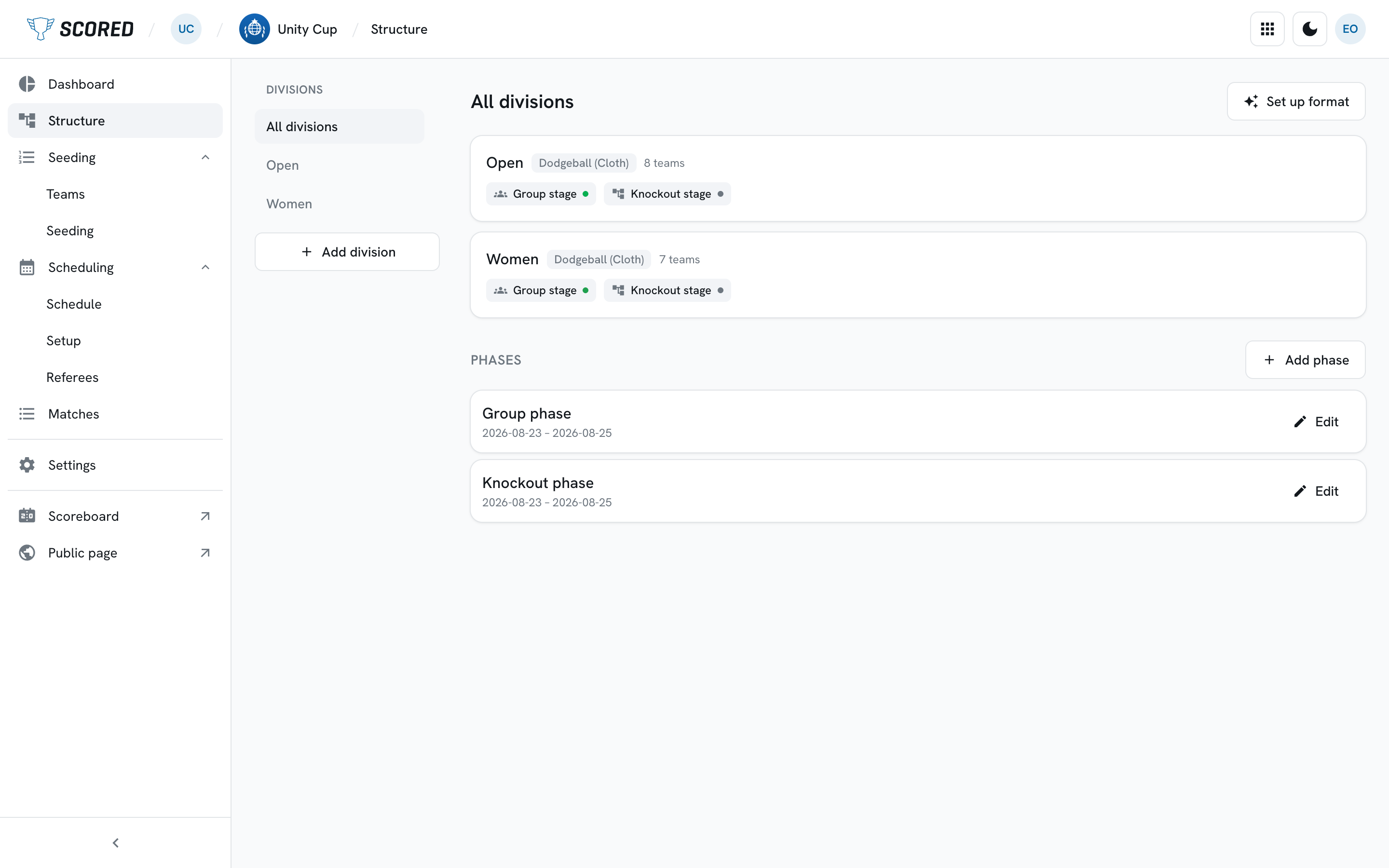
The three words to know
Section titled “The three words to know”Division - one self-contained competition inside your tournament, with its own sport and its own teams. Men’s, Women’s, Juniors, Open. A small tournament often has just one.
Stage - one block of play inside a division. A group stage where everyone plays everyone in a pool, or a knockout bracket where the loser goes out. A division can have several, one after another.
Phase - a grouping that runs across all divisions at once, such as “Group phase” and “Knockout phase”. Phases are how the whole tournament lines up in time, so every division shares the same set. Each stage belongs to one.
Setting up your format
Section titled “Setting up your format”The wizard builds a whole tournament’s worth of groups and brackets in one pass. It is the quickest way to start, and you can change anything afterwards.
Open it with Set up your tournament format on an empty tournament or an empty division, or Set up format on the All divisions view.
-
Divisions.
Tick the divisions you want to set up. If one is missing, type a name, pick its sport and click Add division without leaving the wizard.
-
Format.
Pick one of three shapes, which is then used for every division you ticked:
Format What you get Groups → Knockout Round-robin groups feed a single-elimination bracket Groups only Round-robin pools, and final places by standings Knockout only A straight single-elimination bracket, no group stage Underneath, choose what happens to the teams who do not win the championship bracket:
- Championship only - one championship bracket, and everyone else ranked by standings.
- Full placement rounds - extra brackets that play out every place, such as a 5th-place match and a 9 to 16 bracket.
-
Tune.
Each division gets its own row of numbers: how many teams you expect, how many groups to split them into, and how many qualify from each group. A knockout-only division asks for a bracket size instead.
A plain-English summary sits under each row and updates as you type, along the lines of
16 teams → 4 groups of 4 → top 2 to quarterfinals → places 9-16 by standings. Group sizes follow from the team count, so you never set them yourself. If a set of numbers cannot work, the row says so and tells you what to change. -
Review, then Generate.
The last step lists the phases that will be created (only the ones you are missing) and the summary for each division. Generate builds it all.
Working by hand
Section titled “Working by hand”The Structure page lists your divisions down the left. All divisions gives you the overview, and picking a division shows its stages, grouped under their phase headings.
Add a division
Section titled “Add a division”Click Add division below that list, then give it a name and a sport. It opens straight away so you can start adding stages.
Add a stage
Section titled “Add a stage”Open a division, then click Add stage. You need a name, a format, and the phase the stage belongs to.
Change a stage
Section titled “Change a stage”Click any stage card to open its editor below the card. You can rename the stage, show or hide it on your public page, and set its format: the number of teams and groups (with the group sizes shown as they work out), the bracket size, how the groups are named, and which final places the stage decides. Delete stage is at the bottom.
Deleting a stage also removes its matches, and the confirmation tells you how many.
Add or rename a phase
Section titled “Add or rename a phase”Phases live on the All divisions view. Add phase creates one at the end of the tournament, and Edit beside a phase renames it or changes its dates.
What the status on each stage means
Section titled “What the status on each stage means”| Status | What it means |
|---|---|
| Draft | Not started. Everything can still change |
| Locked | Its format is fixed, but you can still rename it and change who sees it |
| Live | Matches are being played |
| Complete | The stage has finished |
A stage locks when its first match starts. After that its format and placement cannot change, and the editor says so.
Stage formats you can use
Section titled “Stage formats you can use”| Format | What it is |
|---|---|
| Group stage | Round-robin pools, and the top teams advance |
| Single elimination | A knockout bracket. Lose and you are out |
Two more formats are on the way and appear in the pickers marked Coming soon, so you can see what is planned:
- Double elimination - a losers’ bracket gives a second chance.
- Swiss system - teams are paired by record, and nobody is eliminated.
They cannot be chosen yet.
What comes next
Section titled “What comes next”Add the teams that will play in each division on Teams, then place them into their groups on the Seeding page in the sidebar.